
Roobet Registration and Login
Roobet launched in 2019 as a crypto-first casino and sportsbook for players worldwide. We are operated by Raw Entertainment B.V. under a Curaçao licence. At Roobet you get over 6,500 casino games from more than 70 providers. When you finish your Roobet registration, you can claim our welcome cashback: up to 20% back on net losses during the first seven days after sign-up, on qualifying slots only and capped at $200. To join us, create an account, verify your information, and log in to see the available games.
 Mobile App
 Payments
 Bonuses
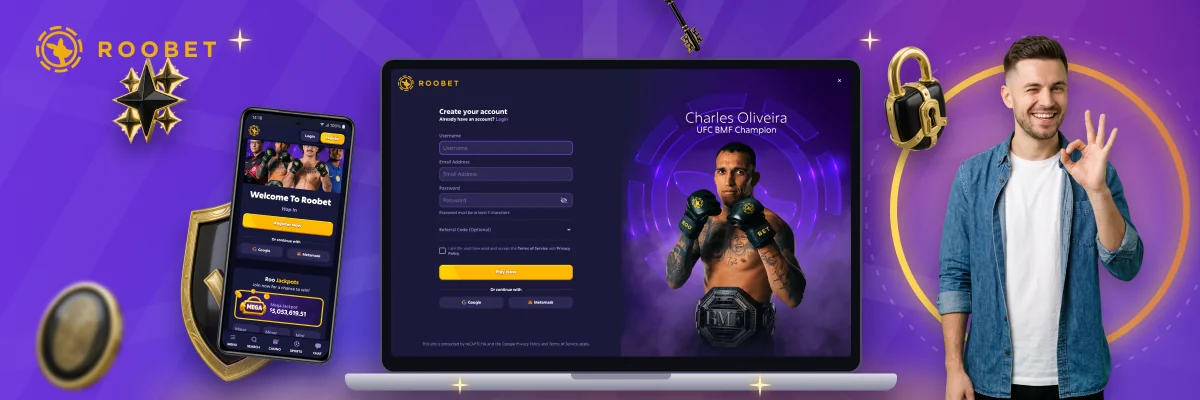
How to Create a New Roobet Account
You fill out a registration form to sign up with us. You can choose from four sign-up options: email, Google, Metamask, or Steam. Each one starts a Roobet sign up in a few simple steps.
- Open the official Roobet site in the browser on your device.
- Pick a way to sign up: email, Google, Metamask, or Steam.
- Provide your information. Follow the steps for the method you selected.
- Check the box to confirm you are 18 or older.
- Read the Terms and Conditions. Accept the Terms and Conditions to continue.
- Enter your information in the form, then click the button to send your registration details.
- Check your inbox for the confirmation email, open it, and click the activation link.
- Go to the official Roobet site, enter your credentials, and log in to reach your account.
Once you are in, you can look around the casino, the sportsbook, and the promotions. Join us and start with the welcome cashback.
Requirements for a Roobet Account
We require you to be at least 18 years old to register. Each person can open a single account. If someone tries to create multiple accounts, we suspend that person. You also need to agree to the Terms and Conditions set by Raw Entertainment B.V. Roobet runs under a Curaçao licence.
We take compliance seriously. You need to submit identity documents for KYC verification, and our team usually checks them within 24 hours. Acceptable conduct means no fraudulent activity, no bonus abuse, and no use of automated tools.
To sign up, you give us an email address. You can also complete your Roobet registration with a Google, Metamask, or Steam account. You can turn on two-factor authentication through an authenticator app, which gives you a new code every 30 seconds.
How to Complete Roobet Account Login
Begin at the official Roobet site. Use any sign-in method you prefer. Your Roobet login works the same way on desktop and on the mobile site.
- Open any browser and go to the official Roobet site.
- Find the login option and click the login button.
- Use the email address you registered and your password to enter your credentials.
- Pick how you want to sign in: Google, Metamask, or Steam. No password is required for these.
- Open your authenticator app and find the current code. Enter this code to complete two-factor authentication.
- If you forget your password, click "forgot password," then check your email and follow the instructions to reset it.
- Find the email and use its link. Set a new password to confirm the reset.
- Once you are logged in, open your account and start to play with us.
Roobet Account Verification Steps
You need to upload identity documents for KYC. After you submit them, we usually check them within 24 hours. We confirm your identity before you make any deposits or withdrawals.
We ask for verification when your account reaches specific milestones. If you do not complete this step, we restrict certain deposit methods and put withdrawal requests on hold. To finish verification faster, send valid documents the first time.
Our support team can ask for additional documentation beyond the standard set. Upload the requested files promptly in your account settings. Quick answers to extra requests reduce delays and lead to faster release of funds. If you need help, use our 24/7 live chat or write to [email protected]. Email replies usually come within 1-3 hours.
How to Enable 2FA on Roobet
Two-factor authentication adds protection to your logins. You can set it up in your account security settings. We recommend it for every account.
- Open the Security Settings in your account menu.
- Go to the 2FA section, then choose the Two-Factor Authentication option.
- Install an authenticator app on your phone.
- Open the authenticator app and scan the code shown on the screen.
- If you do not use the QR code, type in the code shown below it to add the account.
- Keep any recovery details you receive in a safe place, separate from your device.
- Check the setup. Enter the code from the app to complete activation. The code changes every 30 seconds.
Roobet Account Dashboard Summary
Your Roobet account dashboard is organized into sections. Each one serves a specific purpose.
| Section | Description |
|---|---|
| Cashier | Deposit and withdraw using crypto or Visa/Mastercard from $10 |
| Casino | Access to 6500+ games across slots, live tables, and Roobet Originals |
| Betting | Pre-match and live bets on football, cricket, basketball, tennis, and more |
| Promotions | Weekly Raffle, multiplier competition, welcome cashback, and Drops & Wins |
| VIP | Invitation-only club with Rakeback Boost, private tournaments, and gifts |
| Account Settings | Manage email, password, 2FA, KYC documents, and account deletion |
| Support | 24/7 live chat, support email, and Help Center in 10 languages |
You can move between these sections at any time. Our Help Center is available in 10 languages if you need a hand with any of them.
How to Delete a Roobet Account
To close your Roobet account, you email our support team. Before you write, gather your request and the necessary details.
- Send an email to [email protected] with a clear subject line saying you want to delete your account.
- Enter your details. Use the email you provided during sign-up and your account username.
- First, move any USD or crypto from the account to a wallet. Then send the email.
- Check whether you have any cashback rewards. Use them or withdraw them before you close your account.
- Send the email. Expect a reply from [email protected] usually within one to three hours.
- Confirm your decision and follow the steps from our support team. Finish the deletion.
Roobet Registration and Login FAQ
How long does Roobet registration take
After sign-up, you get a new account right away. We usually check KYC documents within 24 hours. You can sign up with email, Google, Metamask, or Steam.
Why does a Roobet login fail
If you enter incorrect information, you cannot log in to Roobet. Access is also blocked if the 2FA code has expired, because the code changes every 30 seconds. Our staff also block accounts that are under investigation. If you are not sure why your login fails, contact our live chat.
Does a player need an account to sign up and play
Yes. Create an account by signing up with us. Once you register, you gain access to all games and betting options. You can deposit funds, play games, and place bets after registration. Join us and pick from slots, live casino, Roobet Originals, or the sportsbook.
Can a Roobet account email be changed later
To change your account email, send a request to [email protected]. We then verify the request and confirm your identity before we update the email.
What Happens to Bonuses on Account Deletion
Contact [email protected] to clarify pending rewards before you delete your account. When an account is deleted, we cancel all active bonuses and rewards. Any remaining bonus balance does not transfer or pay out after account deletion.